What is IBO Player?
IBO Player is the most popular IPTV player for Samsung Smart TV. It is easy to use, looks sleek and works with both Xtream Codes and M3U links — including EPG. The app costs a small one-off amount and you activate it with a code.
Step 1: Install IBO Player
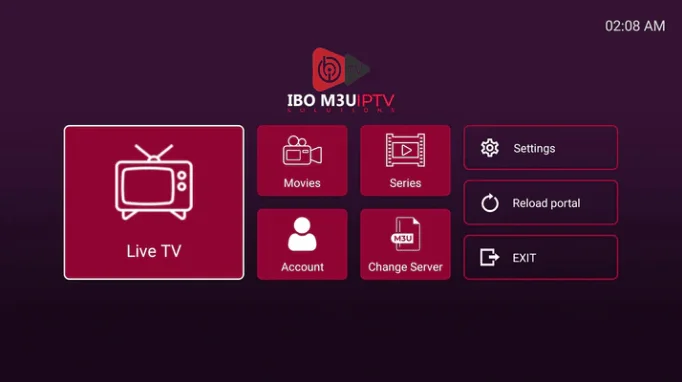
- On your Samsung TV go to Smart Hub (the button with the coloured square on your remote).
- Open the App Store (or Apps panel).
- Search for “IBO Player” and choose Install.
- Open the app after installing.
Step 2: Activate IBO Player
- In the app you see an activation code (e.g. 6 digits/letters).
- On your phone or PC go to ibo.player (the app’s activation page).
- Enter your code, pay the small licence fee if you have not already, and link the code to the app on your TV.
- The app is now active — you only need to do this once.
Step 3: Add your IPTV (Xtream Codes)
- Open IBO Player and choose Xtream Codes (or M3U if your provider gives a link).
- Enter the server URL, username and password from your welcome email. You can read exactly what these are in our Xtream Codes explanation.
- Choose Save — your channels, movies, series and EPG load automatically.
Troubleshooting IBO Player
- App says “invalid code”: type the code exactly as shown (case-sensitive) and check that your TV software is up to date.
- Channels not loading: check your internet connection on the TV and first test your Xtream details on your phone with Smarters.
- EPG empty: give the app a moment after starting, or restart the TV. More in our EPG guide.
- IBO stops working after a TV update: remove the app, restart the TV and reinstall IBO (the activation stays linked to your code).
Frequently asked questions about IBO Player
Is IBO Player free?
The app costs a small amount (one-off or per year), depending on the developer’s current offer. After that you activate it with your code on one TV.
Can I use IBO on multiple TVs?
No — one activation code applies to one device. For a second TV you need a second code.
Does IBO also work on LG?
IBO Player is made for Samsung. On LG you use Hot IPTV or Smart IPTV.
Stuck or not working? Ask your question via our contact page — we help you quickly and free of charge. Or try Pro IPTV free for 24 hours.
Want to know more? which operating system your TV has · the best IPTV app per device
Test Pro IPTV 24 uur helemaal gratis
1️⃣ Installeer SmartOne IPTV op je tv/box · 2️⃣ Stuur je MAC-adres · 3️⃣ Wij doen de rest!
⚡ Stuur je MAC-adres via WhatsAppReady to watch? ready to watch? start your free 24-hour trial